




R
Code to download Datasets from Kenneth
French’s famous website.Version 1.2.0 (development) adds three convenience functions and several quality-of-life improvements while remaining fully backward compatible:
| Function | What it does |
|---|---|
FFget() |
Download one dataset and return it directly — no file I/O required |
FFlist() |
Browse all available datasets as a tidy data frame |
FFmatch() |
Preview fuzzy-match results before triggering a download |
FFdownload() |
Now accepts na_values, return_data,
action, cache_days,
match_threshold |
All existing FFdownload() calls continue to work without
any changes.
Version 1.1.1 corrects a small error for publication on CRAN.
One often needs those datasets for further empirical work and it is a tedious effort to download the (zipped) csv, open and then manually separate the contained datasets. This package downloads them automatically, and converts them to a list of xts-objects (or tibbles) that contain all the information from the csv-files.
Original code from MasimovR https://github.com/MasimovR/. Was then heavily redacted by me.
You can install the stable release of FFdownload from CRAN with:
install.packages("FFdownload")Install the development version (v1.2.0) from GitHub with:
# install.packages("devtools")
devtools::install_github("sstoeckl/FFdownload@dev")FFget() (new in v1.2.0)FFget() is the fastest way to get a single dataset into
your session. No intermediate file, no load() call, and
missing values (-99, -999,
-99.99) are replaced with NA by default.
library(FFdownload)
library(tidyverse)
# Get the FF 5-factor monthly data directly as a tibble
ff5 <- FFget("F-F_Research_Data_5_Factors_2x3", subtable = "Temp2")
#> Step 1: getting list of all the csv-zip-files!
#> Step 2: Downloading 1 zip-files
#> Step 3: Start processing 1 csv-files
#> | | | 0% | |======================================================================| 100%
#> Be aware that as of version 1.0.6 the saved object is named FFdata rather than FFdownload to not be confused with the corresponding command!
head(ff5)
#> # A tibble: 6 × 7
#> date Mkt.RF SMB HML RMW CMA RF
#> <yearmon> <dbl> <dbl> <dbl> <dbl> <dbl> <dbl>
#> 1 Jul 1963 -0.39 -0.48 -0.81 0.64 -1.15 0.27
#> 2 Aug 1963 5.08 -0.8 1.7 0.4 -0.38 0.25
#> 3 Sep 1963 -1.57 -0.43 0 -0.78 0.15 0.27
#> 4 Okt 1963 2.54 -1.34 -0.04 2.79 -2.25 0.29
#> 5 Nov 1963 -0.86 -0.85 1.73 -0.43 2.27 0.27
#> 6 Dez 1963 1.83 -1.89 -0.21 0.12 -0.25 0.29ff5 |>
tidyr::pivot_longer(cols = -date, names_to = "FFFactors", values_to = "Value") |>
group_by(FFFactors) |> mutate(Price = cumprod(1 + Value / 100)) |>
ggplot2::ggplot(aes(x = date, col = FFFactors, y = Price)) +
geom_line(lwd = 1.2) + theme_bw() + theme(legend.position = "bottom")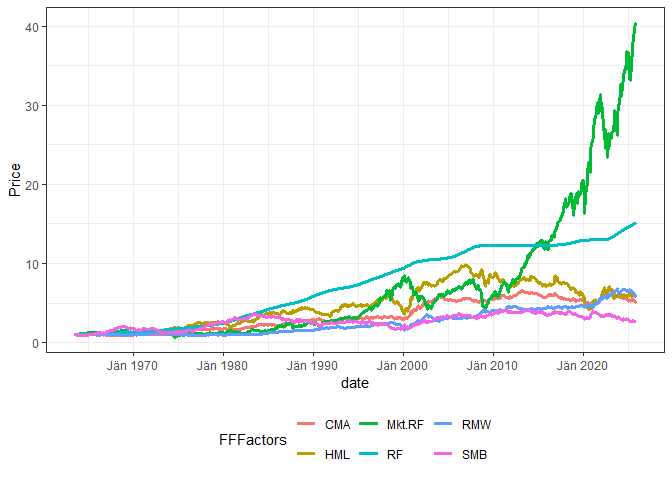
For bulk downloads, reproducible snapshots, or xts
output, see Examples 1–3 below.
FFlist() and FFmatch() (new in
v1.2.0)Before downloading, you can browse all available datasets and verify that your search strings match the intended files.
# All non-daily datasets as a tidy data frame (tibble)
fl <- FFlist()
nrow(fl)        # typically 100+ datasets
#> [1] 193
head(fl, 8)
#> # A tibble: 8 × 2
#>   name                                file_url
#>   <chr>                               <chr>
#> 1 F-F_Research_Data_Factors           https://mba.tuck.dartmouth.edu/pages/facu…
#> 2 F-F_Research_Data_Factors_weekly    https://mba.tuck.dartmouth.edu/pages/facu…
#> 3 F-F_Research_Data_5_Factors_2x3     https://mba.tuck.dartmouth.edu/pages/facu…
#> 4 Portfolios_Formed_on_ME             https://mba.tuck.dartmouth.edu/pages/facu…
#> 5 Portfolios_Formed_on_ME_Wout_Div    https://mba.tuck.dartmouth.edu/pages/facu…
#> 6 Portfolios_Formed_on_BE-ME          https://mba.tuck.dartmouth.edu/pages/facu…
#> 7 Portfolios_Formed_on_BE-ME_Wout_Div https://mba.tuck.dartmouth.edu/pages/facu…
#> 8 Portfolios_Formed_on_OP             https://mba.tuck.dartmouth.edu/pages/facu…
# Filter with dplyr
library(dplyr)
FFlist() |> filter(grepl("Momentum|Reversal", name))
#> # A tibble: 3 × 2
#> name file_url
#> <chr> <chr>
#> 1 F-F_Momentum_Factor https://mba.tuck.dartmouth.edu/pages/faculty/ken.frenc…
#> 2 F-F_ST_Reversal_Factor https://mba.tuck.dartmouth.edu/pages/faculty/ken.frenc…
#> 3 F-F_LT_Reversal_Factor https://mba.tuck.dartmouth.edu/pages/faculty/ken.frenc…FFmatch() shows exactly which file each search string
would be matched to, including a similarity score (below 0.3 = possibly
wrong match):
FFmatch(c("Research_Data_Factors", "Momentum", "ST_Reversal", "zzz"))
#> # A tibble: 4 × 4
#>   requested             matched                           edit_distance similarity
#>   <chr>                 <chr>                                     <int>      <dbl>
#> 1 Research_Data_Factors F-F_Research_Data_Factors                     3      0.87
#> 2 Momentum              F-F_Momentum_Factor                           9      0.44
#> 3 ST_Reversal           F-F_ST_Reversal_Factor                       10      0.42
#> 4 zzz F-F_Research_Data_Factors 22 0.11 ← low!The classic workflow downloads multiple datasets in one call and
saves them to an .RData snapshot — ideal for reproducible
research.
temptxt <- tempfile(fileext = ".txt")
FFdownload(exclude_daily=TRUE, download=FALSE, download_only=TRUE, listsave=temptxt)
FFlist_old <- readr::read_csv(temptxt) %>% dplyr::select(2) %>% dplyr::rename(Files=x)
FFlist_old %>% dplyr::slice(1:3, (dplyr::n()-2):dplyr::n())
#> # A tibble: 6 × 1
#> Files
#> <chr>
#> 1 F-F_Research_Data_Factors_CSV.zip
#> 2 F-F_Research_Data_Factors_weekly_CSV.zip
#> 3 F-F_Research_Data_Factors_daily_CSV.zip
#> 4 Emerging_Markets_4_Portfolios_BE-ME_OP_CSV.zip
#> 5 Emerging_Markets_4_Portfolios_OP_INV_CSV.zip
#> 6 Emerging_Markets_4_Portfolios_BE-ME_INV_CSV.zipThe action parameter (new in v1.2.0) is a readable
alternative to download=TRUE, download_only=TRUE:
tempd <- tempdir()
inputlist <- c("F-F_Research_Data_Factors","F-F_Momentum_Factor","F-F_ST_Reversal_Factor","F-F_LT_Reversal_Factor")
# Classic syntax (still works):
FFdownload(exclude_daily=TRUE, tempd=tempd, download=TRUE, download_only=TRUE, inputlist=inputlist)
# Equivalent new syntax:
# FFdownload(exclude_daily=TRUE, tempd=tempd, action="download_only", inputlist=inputlist)tempf <- paste0(tempd,"\\FFdata.RData")
FFdownload(output_file = tempf, exclude_daily=TRUE, tempd=tempd, download=FALSE,
download_only=FALSE, inputlist=inputlist, format="tbl")
#> | | | 0% | |================== | 25% | |=================================== | 50% | |==================================================== | 75% | |======================================================================| 100%return_data = TRUE (new in v1.2.0) lets you skip the
load() step:
FFdata <- FFdownload(output_file = tempf, exclude_daily=TRUE, tempd=tempd,
                     download=FALSE, download_only=FALSE, inputlist=inputlist,
format="tbl", return_data=TRUE)library(timetk)
load(file = tempf)
FFdata$`x_F-F_Research_Data_Factors`$monthly$Temp2 %>%
left_join(FFdata$`x_F-F_Momentum_Factor`$monthly$Temp2, by="date") %>%
left_join(FFdata$`x_F-F_LT_Reversal_Factor`$monthly$Temp2, by="date") %>%
left_join(FFdata$`x_F-F_ST_Reversal_Factor`$monthly$Temp2, by="date") %>% head()
#> # A tibble: 6 × 8
#> date Mkt.RF SMB HML RF Mom LT_Rev ST_Rev
#> <yearmon> <dbl> <dbl> <dbl> <dbl> <dbl> <dbl> <dbl>
#> 1 Jul 1926 2.89 -2.55 -2.39 0.22 NA NA -1.76
#> 2 Aug 1926 2.64 -1.14 3.81 0.25 NA NA 1.43
#> 3 Sep 1926 0.38 -1.36 0.05 0.23 NA NA -0.07
#> 4 Okt 1926 -3.27 -0.14 0.82 0.32 NA NA -2.03
#> 5 Nov 1926 2.54 -0.11 -0.61 0.31 NA NA 0.98
#> 6 Dez 1926 2.62 -0.07 0.06 0.28 NA NA 1.95FFfive <- FFdata$`x_F-F_Research_Data_Factors`$annual$`annual_factors:_january-december` %>%
left_join(FFdata$`x_F-F_Momentum_Factor`$annual$`january-december`, by="date") %>%
left_join(FFdata$`x_F-F_LT_Reversal_Factor`$annual$`january-december`, by="date") %>%
left_join(FFdata$`x_F-F_ST_Reversal_Factor`$annual$`january-december`, by="date")
FFfive %>% head()
#> # A tibble: 6 × 8
#> date Mkt.RF SMB HML RF Mom LT_Rev ST_Rev
#> <yearmon> <dbl> <dbl> <dbl> <dbl> <dbl> <dbl> <dbl>
#> 1 Dez 1927 29.4 -2.2 -4.58 3.12 24.4 NA -18.7
#> 2 Dez 1928 35.6 3.73 -5.26 3.56 26.5 NA -8.82
#> 3 Dez 1929 -19.6 -30.7 11.9 4.75 19.7 NA -15.0
#> 4 Dez 1930 -31.1 -5.53 -11.8 2.41 24.1 NA -1.18
#> 5 Dez 1931 -44.8 3.07 -13.7 1.07 23.3 -4.62 27.2
#> 6 Dez 1932 -9.6 5.03 11.7 0.96 -20.6 14.1 27.9FFfive %>%
pivot_longer(Mkt.RF:ST_Rev, names_to="FFVar", values_to="FFret") %>%
mutate(FFret=FFret/100, date=as.Date(date)) %>%
filter(date>="1960-01-01", !FFVar=="RF") %>%
group_by(FFVar) %>% arrange(FFVar, date) %>%
mutate(FFret=ifelse(date=="1960-01-01",1,FFret), FFretv=cumprod(1+FFret)-1) %>%
ggplot(aes(x=date, y=FFretv, col=FFVar, type=FFVar)) + geom_line(lwd=1.2) +
scale_y_log10() +
labs(title="FF5 Factors plus Momentum", subtitle="Cumulative wealth plots",
ylab="cum. returns") +
scale_colour_viridis_d("FFvar") +
theme_bw() + theme(legend.position="bottom")
#> Ignoring unknown labels:
#> • ylab : "cum. returns"
#> Warning in transformation$transform(x): NaNs wurden erzeugt
#> Warning in scale_y_log10(): log-10 transformation introduced infinite values.
#> Warning: Removed 11 rows containing missing values or values outside the scale range
#> (`geom_line()`).
FFdownload() and FFget() return a nested
list:
FFdata
└── x_F-F_Research_Data_Factors        # one entry per dataset (x_ prefix avoids R name issues)
    ├── monthly
    │   ├── Temp2                       # main factor returns table (unnamed sections → TempN)
    │   └── ...                         # other sub-tables if present
    ├── annual
    │   └── annual_factors:_january-december
    └── daily                           # empty list unless exclude_daily = FALSE
The most commonly used sub-table in factor files is
Temp2. Use names(FFdata[["x_..."]]$monthly) to
discover all available sub-table names for a given dataset.
This project is licensed under the MIT License - see the license.md file for details.
I am grateful to Kenneth French for providing all this great research data on his website! Our lives would be so much harder without this boost for productivity. I am also grateful for the kind conversation with Kenneth with regard to this package: He appreciates my work on this package giving others easier access to his data sets!